 IntoTheCode
Examples
The demo application
The source code contains 3 examples of programming with IntoTheCode.
- A csv text reader
- A math expression calculator
- A programming language
The examples are all shown in the same user interface. Here is a screen dump from the CSV data example:
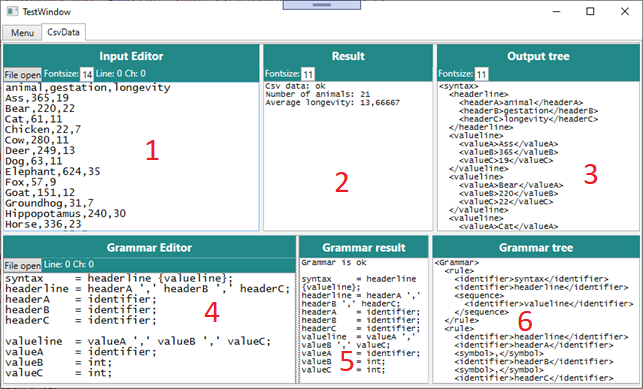
- Input data editor.
- Result: Shows an error message if input is not valid or some output from the ViewModel if input is readable according to grammar.
- Output tree: The output from parser as markup, if input is valid.
- Grammar Editor:
- Grammar result: Shows an error message if grammar is not valid or the text ‘Grammar is ok’ and the same grammar, nicely formatted.
- Grammar tree: Just for parser experts. This is the metaparser output as markup, if input is valid.
After each change to the input, the parser makes a new output tree. The 'Business logic' get a message to work the tree again.
After each change to the grammar, a new parser is created. If this succeeds, then the input is parsed with the new parser. You can change the input to match the new grammar, and then the ‘Output tree’ does work, though the ViewModel result may not work.
Architecture
The demo application is based on a pragmatic Model-View-ViewModel (MVVM) architecture. The TestApp project contains the views. A common UserControl contains all controls, and defines bindings and some functionality to show cursor position. A UserCotrol for each example use the common control and refers to the right ViewModel The IntoTheCodeExamples project contains a ViewModel for each example. All ViewModels has the same ancestor with common properties, and functions for parsing the grammar and parsing the input. When input is parsed successfully, the function called ‘ProcessOutput’ is called on the ViewModel, with a TextDocument as parameter. This is where the output is consumed.